Type Simplified Chinese
with Traditional Zhuyin
用繁體注音
打出簡體中文
注音簡體 lets you keep the Bopomofo layout you already know — and outputs Simplified Chinese instantly. On iPhone and Mac. 注音簡體讓你沿用熟悉的注音鍵盤,輸入後即時輸出簡體中文。支援 iPhone 與 Mac。
Familiar input, the right output熟悉的輸入,正確的輸出
Built on the open-source Chewing engine — fast, accurate, and entirely on-device. 採用開源新酷音(Chewing)引擎,快速、準確,且完全在裝置端運算。
Traditional Zhuyin layout標準注音鍵盤
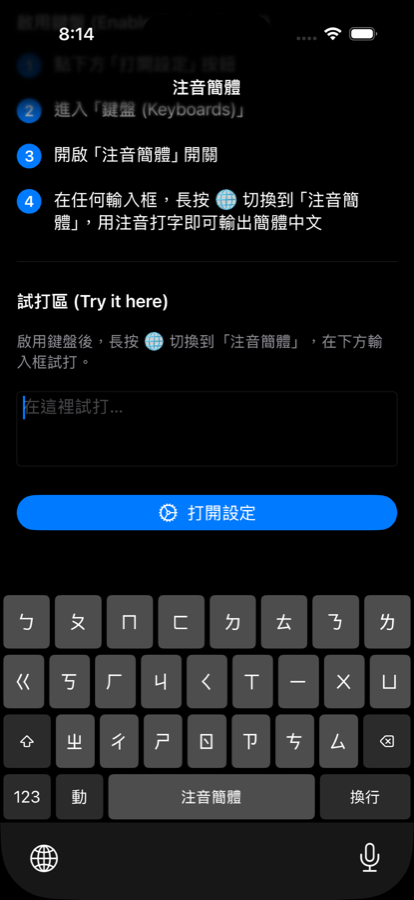
The same 大千 (Dachen) layout used across Apple's Zhuyin keyboards — nothing new to learn. 與 Apple 注音鍵盤相同的大千配置,無需重新適應。
Instant conversion即時轉換
Phonetic input is converted to Simplified Chinese as you type, with smart candidates. 輸入注音時即時轉為簡體中文,並提供智慧候選字。
Privacy by design隱私優先
No network access, no Full Access, no tracking. Everything stays on your device. 無網路連線、不需完整取用權限、不追蹤,一切留在你的裝置上。
注音簡體 for iPhone注音簡體 iPhone 版
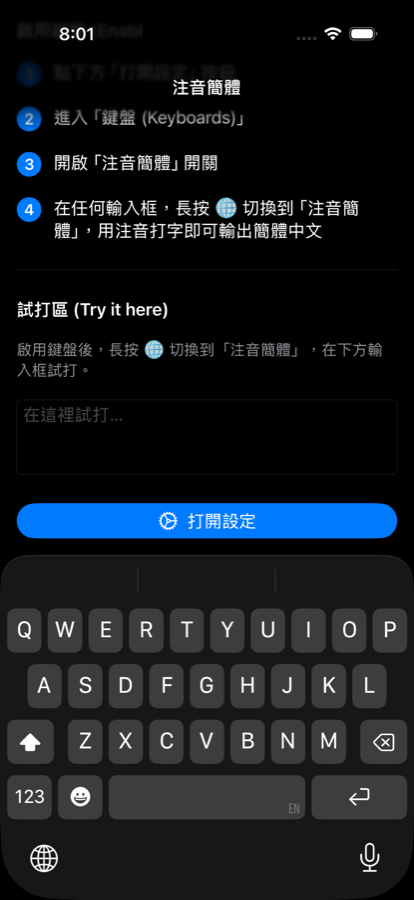
A third-party keyboard for iOS with Standard and Dynamic Zhuyin layouts, number & symbol layers, and a clean candidate bar — in both light and dark mode. iOS 第三方鍵盤,提供標準與動態注音配置、數字與符號層,以及清爽的候選字列,並支援淺色與深色模式。
- ✓Requires系統需求iOS 17.0 +
- ✓Device裝置iPhoneiPhone
- ✓Setup啟用方式Settings → Keyboards → enable 注音簡體設定 → 鍵盤 → 開啟「注音簡體」
- ✓Price價格Free免費
注音簡體 for Mac注音簡體 Mac 版
A native macOS input method that plugs into the system input menu. Type with Zhuyin in any app and get Simplified Chinese everywhere. 原生 macOS 輸入法,整合於系統輸入選單。在任何 App 用注音輸入,隨處輸出簡體中文。
- ✓Requires系統需求macOS 26 (Tahoe) +
- ✓Install安裝Signed & notarized .pkg installer已簽署並公證的 .pkg 安裝檔
- ✓Setup啟用方式System Settings → Keyboard → Input Sources → add 注音簡體系統設定 → 鍵盤 → 輸入來源 → 加入「注音簡體」
- ✓Price價格Free免費
Your typing stays yours你的輸入只屬於你
注音簡體 collects no data. It works fully offline, requests no Full Access, contains no ads, analytics, or third-party SDKs. 注音簡體不收集任何資料,完全離線運作,不要求完整取用權限,也不含廣告、分析或第三方 SDK。